How to Choose Photos for a Personalized Couple Ornament
A personalized photo ornament can bring a whole year back into focus: a first trip, an engagement, a quiet weekend or a favorite Christmas together. The best photo strip tells a small story that the recipient will recognize immediately. Here is how to choose photos and prepare your details for the Couple Photo Strip Ornament at Wood Signs Family.
1. Start with a story, then choose your photos
Pick a theme before searching your camera roll. You might tell the story of your first year together, revisit a wedding day or collect four everyday moments that feel like you. A mix of a portrait, a candid moment and a shared place can feel more personal than several nearly identical selfies.
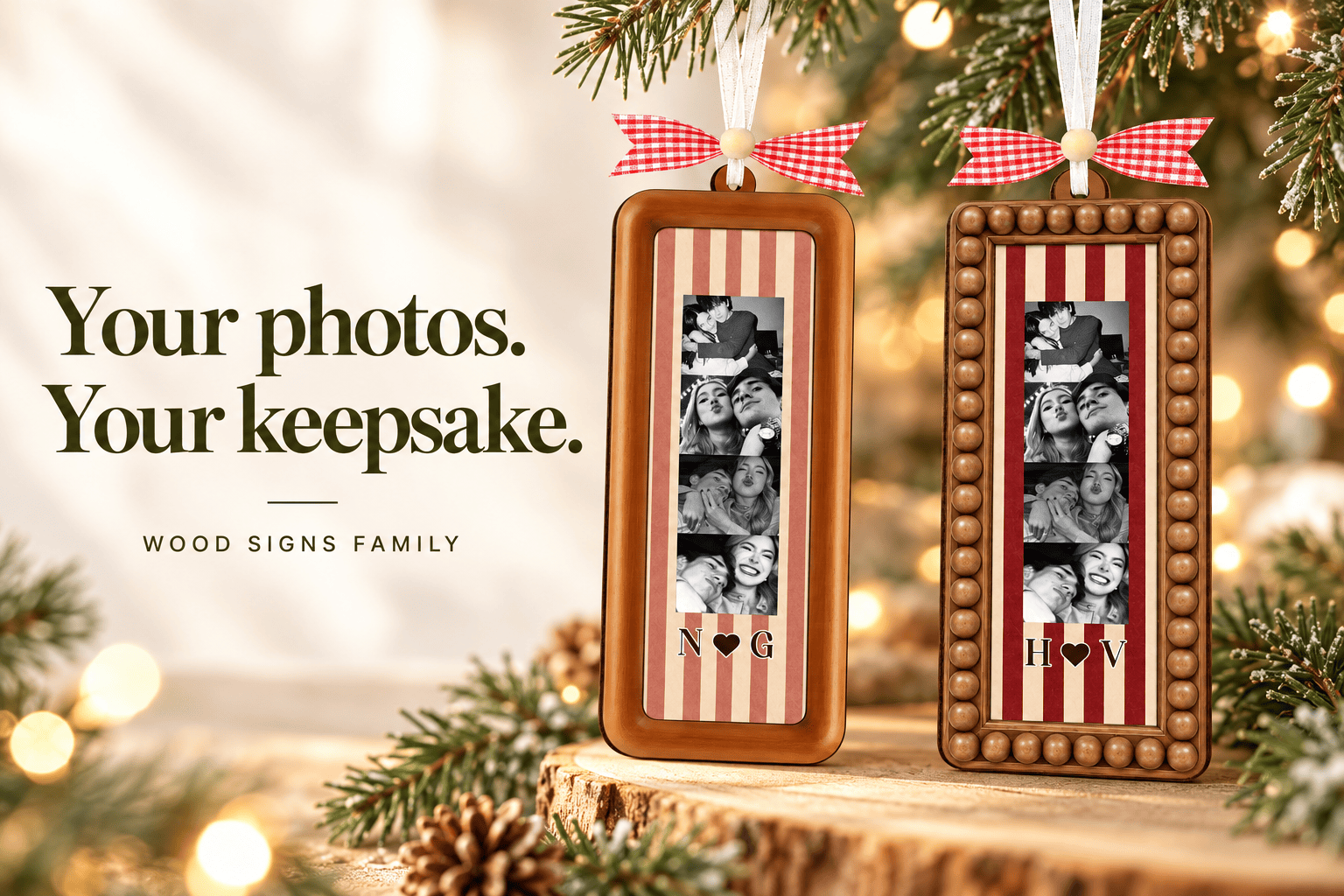
Arrange your shortlist in the order you want someone to read it, from top to bottom. The sample designs show a vertical strip of four photos. If you want a specific sequence, keep a note of that order and check the product instructions before uploading.
2. Choose clear originals with faces easy to see
Use the original photo file when you can. A screenshot or a copy saved from a messaging app may contain less detail than the original. Open each image at a larger size and look at faces: if they already appear blurred or very dark, choose another image rather than expecting a small printed panel to correct it.
Simple backgrounds help faces remain visible. A beautiful wide landscape can lose its meaning when reduced to a small panel, especially if the people are only tiny shapes in the distance.
3. Check the crop for every panel
A photo strip uses a narrow area inside the ornament. Leave some room around heads and avoid placing a face, an important detail or a line of text right against the edge of your source image. When comparing photos, imagine each one displayed much smaller than it appears on your phone.
Preview any crop offered during ordering and read the upload instructions carefully. If the ordering page does not show a preview of your exact arrangement, contact us before placing an order when the crop or sequence is important to you.
4. Match the size and finish to your display
The product page lists sizes of 4, 5, 6, 8, 10 and 12 inches, with four border options labeled B1–B4 and backgrounds shown in a color chart. Check the chart on the product page rather than relying on the colors in a styled photograph. The listed material is wood, with a total thickness of 6 mm across two layers.
Measure the space where you plan to display the keepsake. A smaller option may suit a tree branch, while a larger option needs more room. Use the selected size as your reference; a photograph taken close up does not show the ornament at life size. The page lists a hanging ribbon and gift-ready packaging among the included items.
5. Prepare initials and upload files before checkout
Write the initials or letter names exactly as you want them, including their order and capitalization. For example, check whether you want “A & J” or “J & A.” Select the size, border and background separately, then review the complete combination.
The current product form has Photo 1 plus three additional optional photo-upload fields. Each field states a limit of 20 MB per image. Prepare clear files that fit that limit and check that each selected file appears in the intended field. If you need a different arrangement, ask before ordering.
Your final ordering checklist
- Faces are clear and the photos still make sense at a small size.
- The photo sequence and any crop instructions are clear.
- Initials, capitalization and letter order are correct.
- Size, border, background and quantity are all selected.
- The current price for your chosen combination is checked on the product page.
- Delivery estimates and the shipping policy are reviewed before ordering for a specific occasion.
Common questions
Are both ornaments in the photograph included?
The photograph shows two design examples. Do not treat the styled image as a two-piece bundle: check the quantity and selected option on the product page before checkout.
Can I use this idea for an anniversary or wedding gift?
Yes. The same photo-selection process works for an anniversary, wedding or first Christmas together. Choose memories that matter to the recipient and check delivery timing before committing to an occasion date.
Will every size and border have the same price?
Options can change the price. The current price on the product page and your final checkout show the combination you have chosen.
Turn your shortlist into a keepsake
Ready with your photos? Choose your Couple Photo Strip Ornament options, or explore the Christmas Ornament collection for more keepsake ideas. A little time spent choosing the photos makes the finished gift feel like your story.
SHARE